For cabinet makers and board-cutting workshops
Cut and edge software for cut-to-size shops.
Turn a customer's cutting list into a reviewed job, a BOM quote and a production file. AnyCutlist brings order intake, part review, material and operation pricing, and sheet optimization into one workflow for shops cutting plywood, MDF and melamine boards.
Planning a single project? Use the free cut list optimizer.
From a cut-to-size order to the shop floor
The cutting list is the job: dimensions, quantities, materials and operations stay connected as your team checks, prices and prepares it for production.
- 1
Collect the customer's cutting list
Import a phone photo, handwritten list, PDF, spreadsheet or supported 3D model. Customer intake links let customers submit their requirements to your workshop for review.
See supported PDF workflows - 2
Review the parts and operations
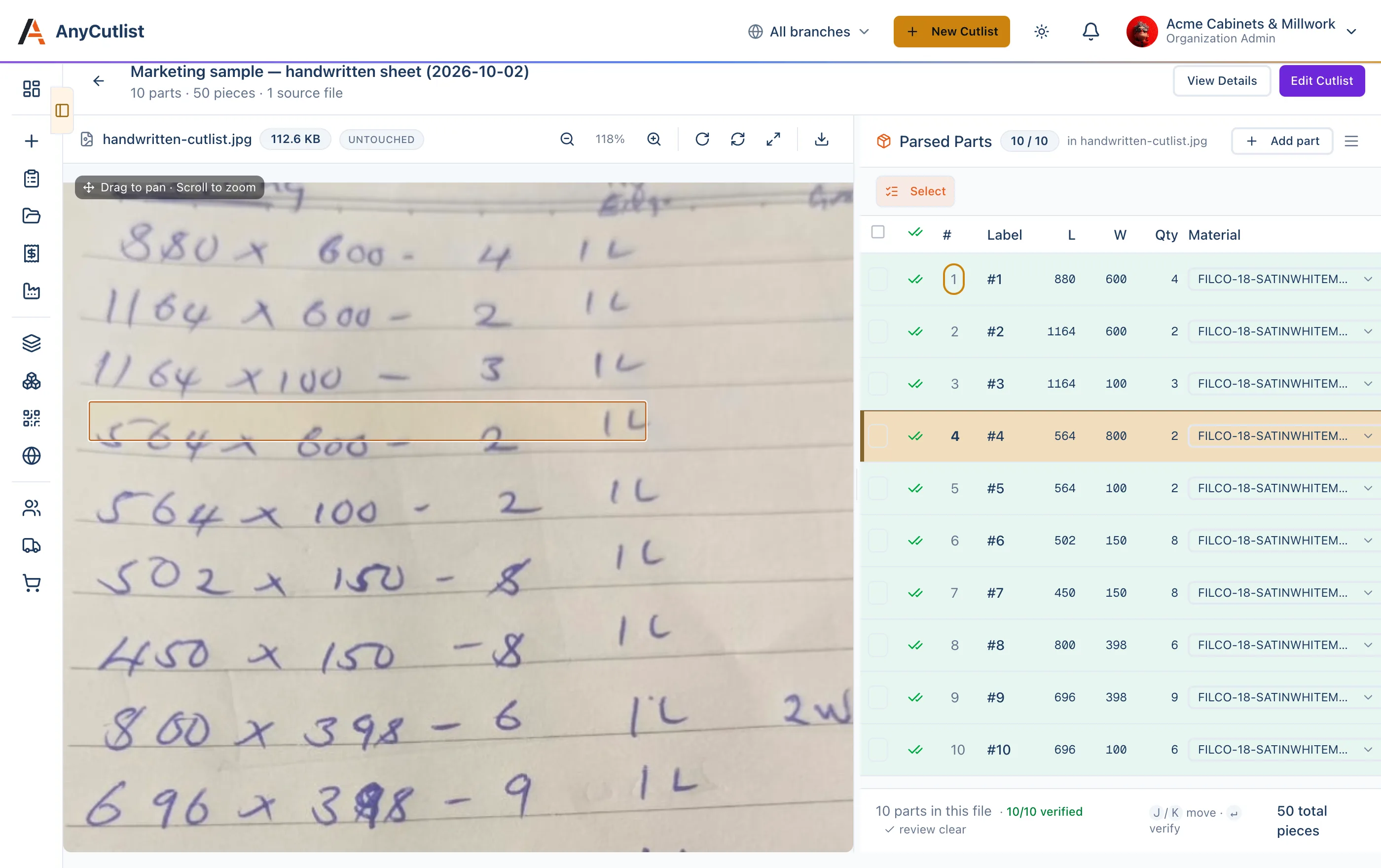
Check lengths, widths, quantities, board choices, grain, edging and grooves against the source. Correct uncertain values, add missed parts and confirm the job before sending it forward. OCR helps with transcription; it still needs a person to check the result.
Follow the handwritten cutlist guide - 3
Build a quote from the reviewed job
Use your material catalogue and configured rates to calculate the bill of materials, cutting, edgebanding and other assigned operations. Add hardware and services such as delivery or installation to the quote. The parts and operations saved in AnyCutlist define the job being priced.
See how operation pricing works - 4
Plan the sheets and prepare production
Optimize rectangular parts with saw kerf, usable sheet sizes and grain constraints. Review the layout, sheet count and offcuts, then export to the production software your shop uses. Available formats include MaxCut, CutList Plus, CAI 2D, CSV and DXF.
Walk through a MaxCut import
Check the source before cutting
Review beside the customer's drawing
Open the source alongside the parts table. Where a source region is available, selecting a part highlights its location. Review flags help your team inspect uncertain dimensions, quantities and operations before approving the list.
Keep customer instructions and team notes with the cutlist using comments. When a customer changes the order, check the saved parts and quote together before issuing a new file.
Choose the workflow that fits your shop
Quoting and producing customer orders
Use the AnyCutlist application when your team needs saved jobs, customer intake, source review, catalogue pricing, quotes and production exports. Usage allowances and advanced integrations depend on your plan.
Explore the workshop featuresPlanning a personal cutting project
The free cut list optimizer lets you enter sheet or linear parts, set cutting constraints and download a layout PDF. It runs separately in your browser with no sign-up.
Open the free optimizer guideQuestions from cut-and-edge workshops
Is AnyCutlist a cut-to-size board supplier?
AnyCutlist is software for the businesses that provide cut-to-size boards and edgebanding. Your workshop supplies the boards, sets its prices, confirms customer requirements and fulfils the order.
Can I use it for plywood, MDF and melamine jobs?
Yes. Set up the boards your workshop stocks, including dimensions, thickness and prices, then assign each part to the correct material. Check grain direction and usable sizes before optimization.
How does cutting optimization fit into the workflow?
Cutting optimization software arranges the reviewed parts on available sheets under the job's constraints. In AnyCutlist it sits alongside intake, review, quoting and export, so the workshop can work from the same saved cutlist throughout the job.
Does it replace MaxCut or CutList Plus?
You can keep using those tools. AnyCutlist can prepare reviewed part lists for export to them, or use its own sheet optimization workflow. Check the destination format and workshop settings before production.
Which plan do I need?
Plans have different AI parsing allowances, workflow features and usage limits. Review the current pricing table for your workshop's requirements. The separate free cut list optimizer needs no account and is available for individual cutting plans.