Turn Any Cut List Into a
Quoted, Production-Ready Job.
Upload a photo, PDF, spreadsheet, 3D model, pasted list or voice note. AnyCutlist extracts the parts, flags uncertainty for review, creates a current quote, and carries accepted work through optimization and production.
Watch a handwritten list go in · 2:17Every cabinet shop knows
this nightmare
Napkin Math
Handwritten notes with coffee stains and illegible dimensions
Excel Hell
47 merged cells, broken formulas, and references to deleted sheets
PDF Chaos
Scanned documents from clients with zero standardization
Last-Minute Calls
"Can you add 3 more shelves? I need it by tomorrow."
Hours wasted. Errors introduced. Money lost.
There's a better way.
A phone photo of a scribbled note in.
A checked, CNC-ready list out.
Ten handwritten lines, snapped on a phone. AnyCutlist read all ten parts — 50 pieces — structured every dimension, material and edge code, and kept each row tied to the line it came from, so a human confirmed all ten against the photo before the saw.
 2:17
2:17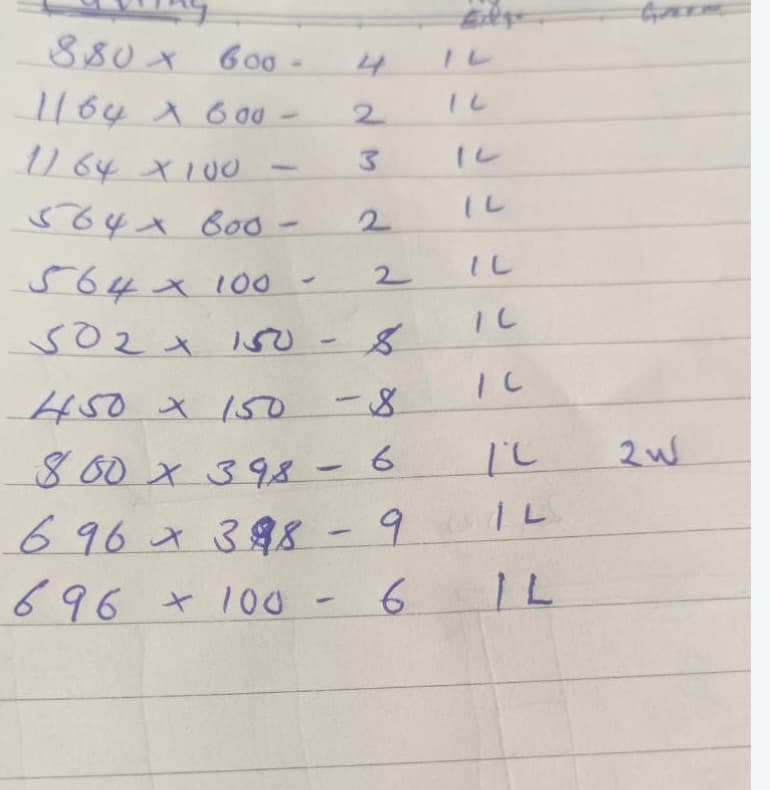
Shorthand, no labels, mixed columns — exactly how it arrives.
Eight ways in.
One clean output.
AnyCutlist doesn't care how your data arrives. Voice memo? Scanned PDF? A SketchUp model? Copy-paste from an email? A link your customer fills in themselves? We've seen it all—and we parse it all.
Manual Entry
Smart spreadsheet with instant parsing and validation
Excel & CSV
Intelligent column mapping with auto-detection
Voice Dictation
Speak your cutlist naturally, we transcribe it
OCR & Image
Photos (incl. iPhone HEIC), scans & PDFs, read by AI vision — even hardware scribbled in the margins
QR Templates
QR-coded order forms that flag uncertain fields for review
Copy & Paste
From emails, docs, or any source—we parse it
Already drawn it?
Don't type it again.
Designers and cabinet makers model the job first. AnyCutlist turns the model, the drawing or the box sizes into a checked cutlist, so the parts come from the design instead of someone measuring the screen.
3D models
Export from SketchUp, Fusion, Onshape, Blender or Rhino as GLB, glTF, DAE, STL, OBJ or 3MF. The model is read in your browser: each panel measured, identical parts grouped, hardware and glass left out.
OpenCutList parts lists
Designers already using OpenCutList in SketchUp can drop its CSV or XLSX. Names, SketchUp lengths, materials and edge banding map without setting up a single column.
Drawings & quick cabinets
Photograph a cabinet drawing or type the box sizes. From a drawing, AI reads only the sizes; your workshop's construction rules (backs, grooves, drawers, end panels) make every panel, with a hardware list beside them.
From chaos to
CNC-ready in seconds
Ingest
Data arrives in any format
Voice, photo, PDF, spreadsheet, customer link—doesn't matter
Parse
AI extracts structured data
Handwriting, shop shorthand and edge codes like 2L2W
Validate
Schema verification & confidence scoring
Every part passes 47 validation checks
Match
Smart material matching
Auto-maps to your material library with fallbacks
Review
Verify what the AI flagged
Low-confidence edges & grooves marked for a human check
Export
Optimizer-ready output
MaxCut, CutList Plus, Saw Opt, Cut Rite, ZDCut, and more
Built to be checked,
not blindly trusted.
Photo OCR isn't magic — and we don't pretend it is. AnyCutlist reads every part, then flags the fields it's least sure about — the edge-banding and grooves on a handwritten list — so your team verifies the two that matter instead of re-checking forty, or sending a bad read straight to the saw.
- Per-field confidence on every partDimensions, material, edges and grooves are scored individually — not one blanket number.
- Low-confidence edges & grooves flaggedThe ops inferred from underlines on handwritten forms — the easiest to misread — get a “verify” marker.
- Nothing exports until the flags clearFlagged parts block the export gate until a human confirms them. No silent surprises at the saw.

The review step — the queue lists what still needs a human decision
Stop typing other people's cut lists.
Send them a link instead.
Share a private link with any customer. They enter their own parts — quick shorthand or row by row, picking from your materials and adding notes for the team — from any phone or desktop, no account needed. You get a clean, structured submission in your inbox instead of another WhatsApp photo.
- One private link per customerGenerate it once and share it anywhere. Disable, regenerate, or let it expire — every link is capped and under your control.
- Submissions land in an inbox, not your dataEach cut list arrives quarantined under its own reference for your team to review — convert it to a draft cutlist in one click, or reject it.
- Customer ops feed the same review gateEdging, grooves, drilling and CNC marked by the customer arrive flagged for your team to confirm — nothing skips the checks above.
Quarantined until your team converts it — never straight into your live data
Optimize in-app —
or keep the one you own.
Run AnyCutlist's built-in cutting optimizer for instant nesting and yield — or export clean, validated cutlists straight into MaxCut, CutList Plus, Saw Opt, Cut Rite and more. Nest here or in the tool you already trust — no lock-in, no re-keying.
Need a custom format? We've got you covered.
Talk to our team →Build it once.
Sell and manufacture it again.
Save every repeat cabinet or flat-pack product as a reusable definition — complete with its parts, operations, hardware, services and per-unit estimate. The next order starts with quantities, not re-entry.
Capture the build once
Start from an existing cutlist or use the same Quick Add entry your team already knows.
Keep every production detail
Parts, edging, grooves, drilling, CNC work, hardware and services stay attached to the product.
Choose the output per order
Turn selected quantities into a grouped manufacturing cutlist or a clean per-cabinet quote.
One source of truth
The same saved product drives the quote, grouped cutlist, BOM and downstream production work — with no second copy to keep in sync.
Parts, operations and hardware saved once
Base Cabinet 600
B600 · Base units
KES 18,450
6 parts · 10 hardware
Wall Cabinet 800
W800 · Wall units
KES 16,900
7 parts · 8 hardware
Grouped cutlist
Full parts + hardware
Per-cabinet quote
One clean line per product
Repeat products stay editable — every new order uses the saved definition
From cutlist to
quote, BOM & invoice.
The cutlist is just the start. AnyCutlist carries the same job through pricing, materials, customers, and your accounting system — so one clean parse drives the whole back office.
Instant Quotes
Turn any cutlist into a priced quote — material costs, markup, and tax from your price list, plus hardware and services like delivery or installation. One complete number per job.
Bill of Materials
Auto-generated BOM — boards, edgebanding, and operations costed straight from your material library.
Customer Management
Customers, contacts, and order history in one place — every cutlist tied to the job it's for.
ERP Integration
Send quotes and purchase orders to Zoho Books as linked Zoho items, sync customers and suppliers, and get accepted and invoiced status back. QuickBooks and Xero connectors are on the roadmap.
Branded Order Forms
Your own branded order forms with QR codes — clients fill them in, AI parses them straight back to a cutlist, hardware box included.
Cutlist Sharing
Hand any cutlist to an outside manufacturer as a private link and QR-tagged PDF — they re-import it into their own workshop exactly, no retyping and no account.
Analytics & Reports
Sales, margin, and production reports alongside cutting efficiency and material usage — with CSV export for the back office.
Works with your AI assistant
and your books.
Let Claude or ChatGPT hand customers' lists straight to AnyCutlist, and send the priced job to Zoho Books as real items, with a person in the workshop deciding every step that matters.
Let Claude or ChatGPT hand you the list
Connect Claude, ChatGPT, Claude Code or Cursor to AnyCutlist's MCP server. The assistant passes over a customer's photo, PDF or spreadsheet; AnyCutlist reads it, flags what it is unsure of and saves a draft your team verifies.
- Sign in with your AnyCutlist login — no API key to copy
- An assistant's corrections stay flagged until a person confirms them
- Quotes and machine files wait for a person's approval
- Professional and Enterprise plans
Quotes reach your books as real items
Send quotes and purchase orders to Zoho Books with each board, edge tape, service and catalog item linked to its Zoho item, and get accepted, declined and invoiced status back on the quote.
- Customers and suppliers sync one way or both
- Link items once; cutting and edging link by kind, not by board
- Tax details sent the way your Zoho edition expects
- Enterprise plan
From accepted quote to
finished, packed & out the door.
Accept a quote and AnyCutlist runs the job through the shop — generating the right tasks in the right order, assigning teams and machines, gating on quality, and keeping customers in the loop from cut to delivery.
Production Projects
Accepted quotes flow straight to the floor as tracked jobs — from submitted through cut, QC, and packed.
Smart Task Scheduling
Each job auto-generates its build sequence — cut, edge-band, groove, CNC, drill, assemble, QC, pack — with the right dependencies and parallel stages.
Teams & Machines
Assign crews and machines by skill and capacity — one task at a time, or several at once for multifunctional CNC cells.
Quality Control
Per-part inspection checklists with pass/fail and automatic rework — exported as a branded, downloadable QC report.
Live Production Board
Kanban and queue views show every task — blocked, ready, in progress, done — updating as the floor works.
Customer Tracking
Share a live tracking link or QR so customers can follow their order's progress all the way to delivery.
Built for scale,
deployed on your terms
Granular access control, a versioned REST + webhook API, and managed cloud hosting — designed for multi-site manufacturers and the teams that run them.
Single Sign-On
Google sign-in today, with SAML/OIDC for enterprise identity providers on the roadmap.
Role-Based Access
Granular permissions for operators, estimators, and administrators across multi-site organizations.
Deployment Options
Fully managed cloud hosting with per-organization data isolation — private cloud and on-premise on the roadmap.
Audit Logging
Activity logging across parses, edits, exports, and admin actions, scoped per organization.
Open API
REST and webhook APIs integrate AnyCutlist with your ERP, MRP, CAD, and order-management systems — and an MCP server lets AI assistants such as Claude and ChatGPT work with your cutlists.
Public Catalog & Storefront
Publish a branded, shareable catalog of your products, boards, edgebanding, and hardware today — with online ordering and checkout directly from the catalog on the roadmap.
Dedicated Support
Priority support with a named point of contact and hands-on onboarding.
Built for production
curl -X POST https://www.anycutlist.com/api/v1/parse-jobs \
  -H "X-API-Key: cai_your_api_key" \
  -H "Content-Type: application/json" \
  -d '{
    "source": {
      "type": "text",
      "content": "Side panel 720x560 qty 2 white board"
    },
    "options": { "defaultThicknessMm": 18, "aiMode": true }
}'What shops are
saying.
“We used to lose half a day re-typing client cutlists into our optimizer. Now a photo goes in and a clean, checked list comes out — the saw never sees a bad read.”
“The review gate is the part I trust. It doesn't pretend the photo was perfect — it tells me exactly which edges to check before I commit material.”
“One parse drives the quote, the BOM and the job on the floor. We stopped keeping three spreadsheets in sync.”
Exports into the tools you already run
Built for the messy reality
of a busy shop
A clean parse is only the start. The tools that save a production office hours are the unglamorous ones — real spreadsheet imports, bulk edits, a trail you can trust. AnyCutlist ships them all.
Production-grade Excel import
Drag in a real workbook — multiple tabs, headers that don't start on row 1, even a single "600 × 400" size cell — and AnyCutlist finds the columns, splits the sizes, and scores every row. Not a fragile CSV reader.
Mass changes, no busywork
Select parts by size, material, label, group, operation or confidence — then re-material, re-band, retag, multiply quantities, swap L/W or merge duplicates across the whole selection. Every edit is undoable.
Audit trail on every part
Each row remembers who verified it and when, the source document it came from, and how confident the AI was in every field — and each cutlist keeps a full activity history of edits, exports and reviews.
Smart review queue
47 validation checks catch oversize parts, missing materials, low-confidence reads and duplicate rows, then hand you a queue of exactly which parts to look at — nothing slips through to the saw.
Cutting optimization built in
AnyCutlist doesn't just capture the list — its built-in optimizer lays parts out for maximum yield across your sheet sizes, so you go from photo to optimized cutting plan without a second tool.
Multi-branch, multi-user
Run several branches under one organization, each cutlist tagged to the location it belongs to, with role-based access that keeps the front office and the shop floor in their own lanes.
What sets us apart from
traditional cutting software
MaxCut, Cutlist Plus, SketchCut, Smart2D Cutting and Cutting Optimization Pro are capable optimizers — but they all begin after the cutlist has been typed in, on a single Windows PC. AnyCutlist runs the whole job in the browser: from the photo on the shop floor to the priced quote and the cutting station.
Already invested in a desktop optimizer? AnyCutlist exports to the formats it reads — so it can feed your saw directly, or hand the finished cutlist off to the tool you already trust. It sits in front of your workflow, not on top of it.
Simple, transparent pricing
Start free, upgrade as you grow. No hidden fees. Cancel anytime.
Free
- 5 cutlists per month
- 10 optimization attempts per month
- 50 parts per cutlist
- AI & OCR with pay-as-you-go credits
- Manual & CSV input
- PDF & CSV export
- Basic edgebanding
Starter
- 50 cutlists per month
- 100 optimization attempts per month
- 200 parts per cutlist
- 100 AI parses + 50 OCR units per month
- Excel import & voice input
- Custom branding
- Bulk operations
Professional
- 300 cutlists per month
- 700 optimization attempts per month
- 1,000 parts per cutlist
- 400 AI parses + 500 OCR units per month
- Voice input & all export formats
- Full CNC ops & QR templates
- Quotes with hardware & services
- Customer intake links
- Public catalog links
- API, webhooks & priority support
Enterprise
- Unlimited cutlists, parts, AI, OCR & optimizations
- Multiple locations
- Public catalog + online storefront (coming soon)
- Google sign-in; SAML/OIDC on the roadmap
- Zoho Books ERP sync + custom integrations
- Service levels defined by agreement
- Dedicated account manager
- Custom onboarding & training
Paid allowances reset on your monthly subscription anniversary, including with yearly billing. Free allowances reset on the 1st of each month.
View full pricing details →Questions, answered.
Q.How accurate is the AI parsing?
It depends on the input. Clean digital files — Excel, CSV, and scannable QR order forms — parse at very high accuracy. Handwritten notes and photos are read part-by-part, and AnyCutlist flags the fields it's least sure about (usually edge-banding and grooves) so your team verifies those instead of trusting a blind read. Nothing exports until the flagged parts are confirmed.
Q.What file formats can I upload?
Just about anything a cutlist arrives in. Photos and scans (JPG, PNG, WebP, GIF — including HEIC/HEIF straight off an iPhone — plus TIFF and BMP), PDFs, spreadsheets (Excel .xlsx/.xls, CSV and TSV), and documents (Word .docx, .txt, .rtf, HTML). iPhone photos and other formats are converted automatically — or skip files entirely and dictate the cutlist by voice.
Q.Will it work with my CNC or optimizer?
Yes. Export validated cutlists straight to MaxCut, CutList Plus, Saw Opt, Cut Rite, ZDCut, AutoCUT Expert, generic CSV and PDF — or run AnyCutlist's built-in optimizer. No lock-in, no re-keying. Need a format we don't list yet? Tell us and we'll add it.
Q.Is my data secure?
Every organization's data is isolated from every other, encrypted in transit and at rest, and hosted on managed cloud infrastructure. Role-based access lets you control exactly who on your team can see and edit what.
Q.Do I need a credit card to start?
No. Your first 7 days are free with no card required, and you can cancel anytime. Start on the free plan and upgrade only when you're ready.
Q.How long does setup take?
Most shops parse their first cutlist in under five minutes. Import your material library, pick how your data arrives, and go — there's no implementation project to schedule.
Q.Can I keep the software I already use?
Absolutely. AnyCutlist cleans and validates the cutlist, then hands it to whatever you nest and cut with today. Use our optimizer if you want one, or keep yours — your call.
Q.Can my customers enter their own cut lists?
Yes — share a private intake link and they type their parts on any phone or computer, no account needed. Each submission lands in a submissions inbox under its own reference (SUB-001, SUB-002…), and your team converts it to a draft cutlist in one click — or rejects it. Links can be disabled, regenerated, or left to expire anytime.
Q.Can I make a cutlist from a SketchUp or 3D model?
Yes. Download an STL from SketchUp Free, export COLLADA from SketchUp Pro or Go, or export GLB, glTF, OBJ or 3MF from Fusion, Onshape, Blender or Rhino, and drop it on the Design tab. The model is read in your browser, each panel becomes a part with its measured size, and anything doubtful is flagged for review. OpenCutList CSV exports work too.
Q.Does AnyCutlist work with ChatGPT or Claude?
Yes, through its MCP server on the Professional and Enterprise plans. Connect Claude, ChatGPT (in developer mode), Claude Code or Cursor, sign in, and the assistant can hand customers' lists to AnyCutlist to read and save as drafts. A person still confirms flagged fields and approves every quote and machine file.
Q.Does it connect to my accounting software?
Zoho Books, on the Enterprise plan: customers and suppliers sync, quotes go across as Zoho quotes and purchase orders as purchase orders with linked items, and accepted, declined and invoiced status comes back. QuickBooks and Xero are on the roadmap.
Still have a question?
Talk to our team →Stop transcribing.
Start manufacturing.
Your first 7 days are free. No credit card required. Set up in under 5 minutes.